
A Complete Beginner’s Guide for 2026
Key Takeaways
- AI is now accessible to everyone; you don’t need technical skills to start using it.
- Begin by identifying one specific problem you want AI to solve for you.
- Choose beginner-friendly AI tools like ChatGPT, which require no installation and have simple interfaces.
- Learn to give clear prompts to AI for better results; clarity significantly impacts output quality.
- Practice using AI daily to build confidence and overcome the initial intimidation of this technology.
Artificial Intelligence is no longer reserved for engineers, data scientists, or large tech corporations. Today, AI is accessible to everyone — for everyday tasks at work, at home, and everywhere in between.
If you’ve ever felt confused or intimidated by AI technology, you’re not alone. Most people believe they need coding skills or advanced programming experience to get started. That’s simply not true.
This beginner’s guide will show you, step by step, how to start using AI confidently — no technical background required. By the end, you’ll understand exactly what AI can do for you and how to use it every single day.
✔ Who This Guide Is For: Anyone who wants to use AI tools in daily life — whether for work, learning, writing, or saving time — with zero prior experience.
What “Using AI” Actually Means for Non-Technical People
When most beginners hear “AI,” they picture complex systems, robots, or lines of code. In practice, using AI for everyday tasks is far simpler than that.
Using AI usually means:
- Typing a question or request into a chat interface
- Clicking buttons inside an app or web tool
- Letting software suggest ideas, corrections, or improvements
You are not building AI. You are using AI-powered tools — just like you use Google Search, spell-check, or a calculator. Think of AI as a smart assistant that helps you write faster, think more clearly, and get things done.
Why You Don’t Need Technical Skills to Use AI
Modern AI tools are designed specifically for everyday users. Software companies know most people don’t write code, so they build tools that anyone can use through simple, plain-language interfaces.
Here’s why beginners can start immediately:
- Most AI tools work through plain text — just type what you want
- Interfaces are clean, intuitive, and browser-based
- No installation or setup required for most tools
- Free versions are widely available
⚠ Actionable Tip: If an AI tool requires you to write code before it’s useful, skip it. Beginner-friendly AI never requires programming.
Step 1: Identify One Problem AI Can Solve for You
The most common beginner mistake is opening an AI tool with no clear goal. This leads to confusion and frustration fast.
Instead, start with one specific problem. Ask yourself:
- Do I want to write emails faster?
- Do I want help learning something new?
- Do I want to save time on repetitive tasks at work?
- Do I want help organizing my thoughts or ideas?
AI delivers its best results when you give it a clear, focused purpose. Pick one use case and start there.
Popular Beginner Use Cases
- Drafting and rewriting emails or messages
- Summarizing long articles or reports
- Brainstorming ideas for projects or content
- Planning daily schedules and to-do lists
- Learning unfamiliar topics in plain language
Step 2: Choose a Beginner-Friendly AI Tool (No Coding Needed)
For people just starting out, the best AI tools are text-based, conversational, and work directly in your browser. You don’t need to install anything.
What to Look for in a Beginner AI Tool
- Works in any web browser
- Has a simple text input or chat box
- Responds in plain, easy-to-understand language
- Offers a free version to try
Popular beginner-friendly options include ChatGPT (OpenAI), Google Gemini, Microsoft Copilot, and Claude (Anthropic). All are free to start and require no technical setup.
✔ Pro Tip: Start with just one tool. Trying multiple tools at once is one of the most common beginner mistakes that leads to overwhelm.
Step 3: Learn How to Talk to AI (Prompting Basics)
AI responds to instructions called “prompts.” Don’t let the term intimidate you — a prompt is simply what you type to tell the AI what you want.
The quality of your result depends almost entirely on the clarity of your request.
Prompt Examples: Weak vs. Strong
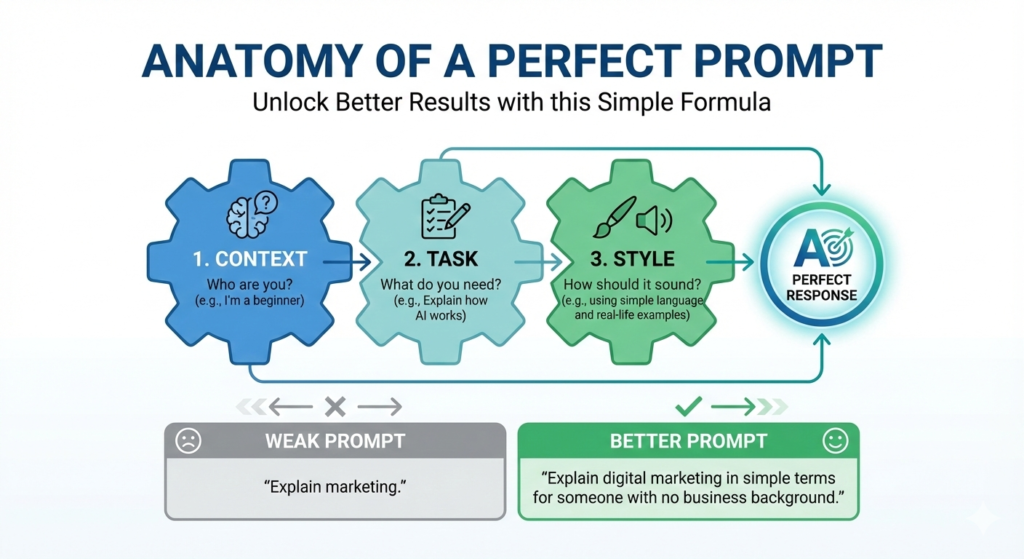
Weak prompt:
“Explain marketing.”
Strong prompt:
“Explain digital marketing in simple terms for someone with no business background. Use real-life examples.”
A Simple Prompt Formula for Beginners
Use this structure whenever you’re unsure how to ask:
Formula: Context + Task + Style
Example: “I’m a beginner with no tech background. Explain how AI works using simple language and real-life comparisons.”
You don’t need perfect wording. You just need clarity.
Step 4: Real-World Examples of Using AI Without Technical Skills
Example 1 — Writing Emails and Messages
AI is one of the most powerful tools for drafting and improving written communication. Use it to:
- Write professional emails from scratch
- Rewrite messages to sound polite, clear, or confident
- Fix grammar, tone, and clarity
Try This Prompt: “Rewrite this email to sound professional and friendly: [paste your text here]”
Example 2 — Learning Something New
AI makes complex topics accessible. Instead of searching through long articles, ask AI to explain things in the way that works best for you.
- Request simple, jargon-free explanations
- Ask for step-by-step breakdowns
- Use examples instead of abstract theory
Try This Prompt: “Explain how credit cards work for someone who has never used one.”
Example 3 — Saving Time at Work
AI can handle time-consuming tasks so you can focus on what matters most. Even complete beginners can use it to become significantly more productive.
- Write meeting summaries and recaps
- Create task lists and project plans
- Brainstorm ideas and solutions quickly
Try This Prompt: “Create a simple daily task list for someone working from home with back-to-back meetings.”
Example 4 — Content and Social Media
Whether you write blog posts, emails, or social media captions, AI can boost your output without replacing your creativity.
- Generate content ideas and outlines
- Improve clarity and structure of existing drafts
- Create social media captions in seconds
Try This Prompt: “Give me five Instagram caption ideas for a small bakery business.”
Step 5: Build Confidence Through Small Daily Habits
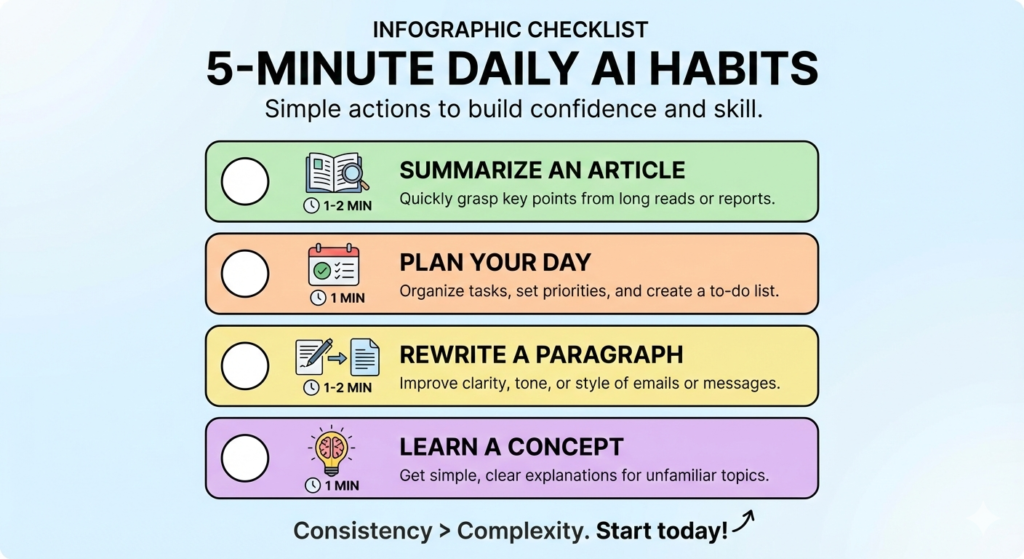
You don’t learn AI by reading about it — you learn it by using it. Even 5–10 minutes a day is enough to build real confidence over time.
Easy Daily AI Habits to Start Today
- Ask AI to summarize one article you read
- Use it to help plan your day or prioritize tasks
- Rewrite one email or paragraph before sending it
- Ask AI to explain one unfamiliar term or concept
Consistency matters far more than complexity. Small daily practice is the fastest path to confidence.
Step 6: Understand What AI Can and Can’t Do
AI is a powerful tool — but it’s not perfect. Understanding its limitations will help you use it more effectively and responsibly.
What AI Is Great At
- Explaining concepts in plain language
- Generating ideas, outlines, and drafts
- Organizing and summarizing information
- Helping with writing, tone, and clarity
What AI Is Not Good At
- Making decisions that require human judgment
- Understanding deep emotional nuance
- Always being 100% accurate or up to date
- Replacing human creativity, empathy, or expertise
⚠ Always Verify: Never trust AI blindly for health, legal, or financial information. Always cross-check important facts with reliable sources.
Common Beginner Mistakes to Avoid
Most early frustrations with AI come from a handful of easily avoidable habits. Watch out for these:
- Copying AI-generated text without reviewing or editing it
- Asking vague questions and expecting detailed answers
- Trusting every AI output without fact-checking
- Trying five different tools at the same time
- Sharing sensitive personal or confidential data with AI tools
✔ Rule of Thumb: Always treat AI output as a first draft, not a finished product. Review, edit, and personalize before using.
How AI Fits Into the Future of Work
AI is rapidly becoming a foundational workplace skill — like knowing how to use email or spreadsheets. The professionals who thrive won’t necessarily be the most technical. They’ll be the ones who know:
- What to ask AI for
- When to use AI — and when not to
- How to combine AI output with their own expertise and judgment
Starting today gives you a real competitive advantage. Every day you practice, the skill compounds.
Conclusion: You’re More Ready Than You Think
Starting with AI doesn’t require intelligence, programming knowledge, or any technical background. It only requires curiosity and a willingness to try.
- Begin with one specific task
- Ask clear, specific questions
- Practice for just a few minutes each day
AI is not here to replace you — it’s here to support you. The best time to start using it is right now.
Absolutely. Most modern AI tools are built specifically for non-technical users. If you can type a sentence, you can use AI.
No. Most AI tools run directly in your web browser with no downloads or installation needed.
Most leading AI tools offer free versions with optional paid upgrades for more features. You can do a lot without spending a penny.
Yes, as long as you avoid entering sensitive personal, financial, or confidential information into public AI tools.
AI replaces specific tasks, not entire roles. People who learn to use AI effectively become more valuable — not less. Think of it as gaining a superpower, not losing a job.
ChatGPT (OpenAI), Google Gemini, Microsoft Copilot, and Claude (Anthropic) are all excellent starting points. All offer free access and require no technical setup.

